
In today smart home technology field, the Smart Hub, which can also called as Smart Security Hub is an important part of the home security system. To be specific, it is not only necessary for developing the applications for multiple devices and offering the function of the data exchange but they are also work for making the whole system more and more stable and effective for the security.
What is a Smart Hub?
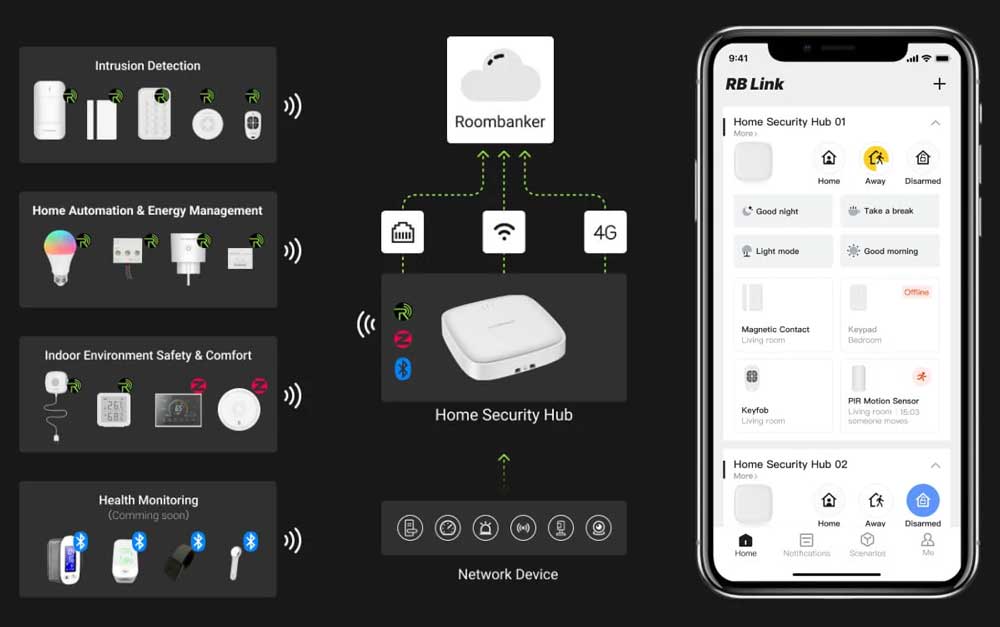
A Smart Hub is defined as an IoT central station that plays a central role in an IoT home network. This will involve linking smart entities and it will be accountable for data transferring and also conversion of protocols.
It is also important to note that the Smart Hub directs the flow of information from the home local area network to the internet and vice versa, safely and efficiently translating data between the two. Its work uses widely supported communication protocols like Wi-Fi, Zigbee, Bluetooth, Z-Wave, RBF, and this enables devices with different protocols to interconnect seamlessly.
Why Use a Smart Hub in the Home Security System?
1. Centralized management and control
Thus, the Smart Hub connects disparate security devices to a single platform and organizes devices through a single app interface to control and monitor these smart gadgets. This makes the system quite simple and eradicates the hassles of having to work with many different devices separately as they can all be accessed from the Smart Hub.
The home security system captured in the platform is integrated hence providing the users with a solution that will enhance efficient provision of security at home.
2. Device Interoperability
This is one of the salient features of Smart Hub since it provides for wireless communication using multiple protocols. It makes sure that the devices belonging to different brands and types can interact with one another properly. Through the use of a common platform, the Smart Hub enables multiple devices to be connected under one seamless network, thus improving compatibility and expandability.
3. Remote monitoring and control
It aims through this that the users are able to access and control the smart devices in their homes through the use of mobile phones or computers. This feature allows the users to communicate and observe their homes in real-time.
Besides, receiving information on the Smart Hub platform, users receive Alerts and can take immediate countermeasures in connection with abnormal conditions, for instance, intrusion or fire.
4. Automated and personalized scenes
Smart Hub carries intelligent functionality, with options to preset automatic settings, scenarios, and rules. For example, it can make lights turn on whenever someone gains access to a certain room or give an alarm when a door and its corresponding windows are opened.
Additionally, users are able to select diverse scenarios (e. g. ‘Home’, ‘Away’, ‘Night’) that cause multiple devices to be linked at a touch of a button providing comfort and increasing their efficiency and value of life.
Also Read: Arm Away vs Arm Stay
5. Enhanced security
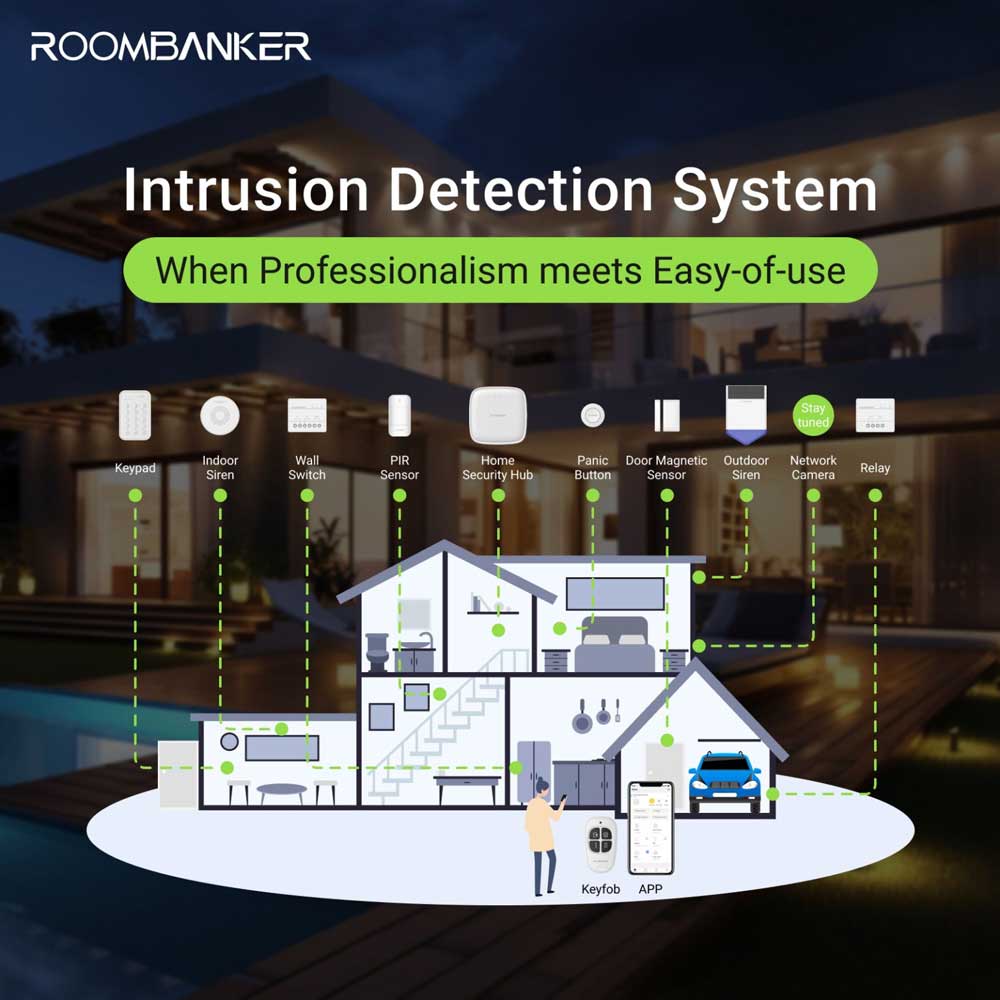
The other advantage of a Smart Hub in a home security system is that it can enable real-time monitoring by the use of cameras, door magnetic sensors, and even smoke alarms among a host of other connected gadgets.
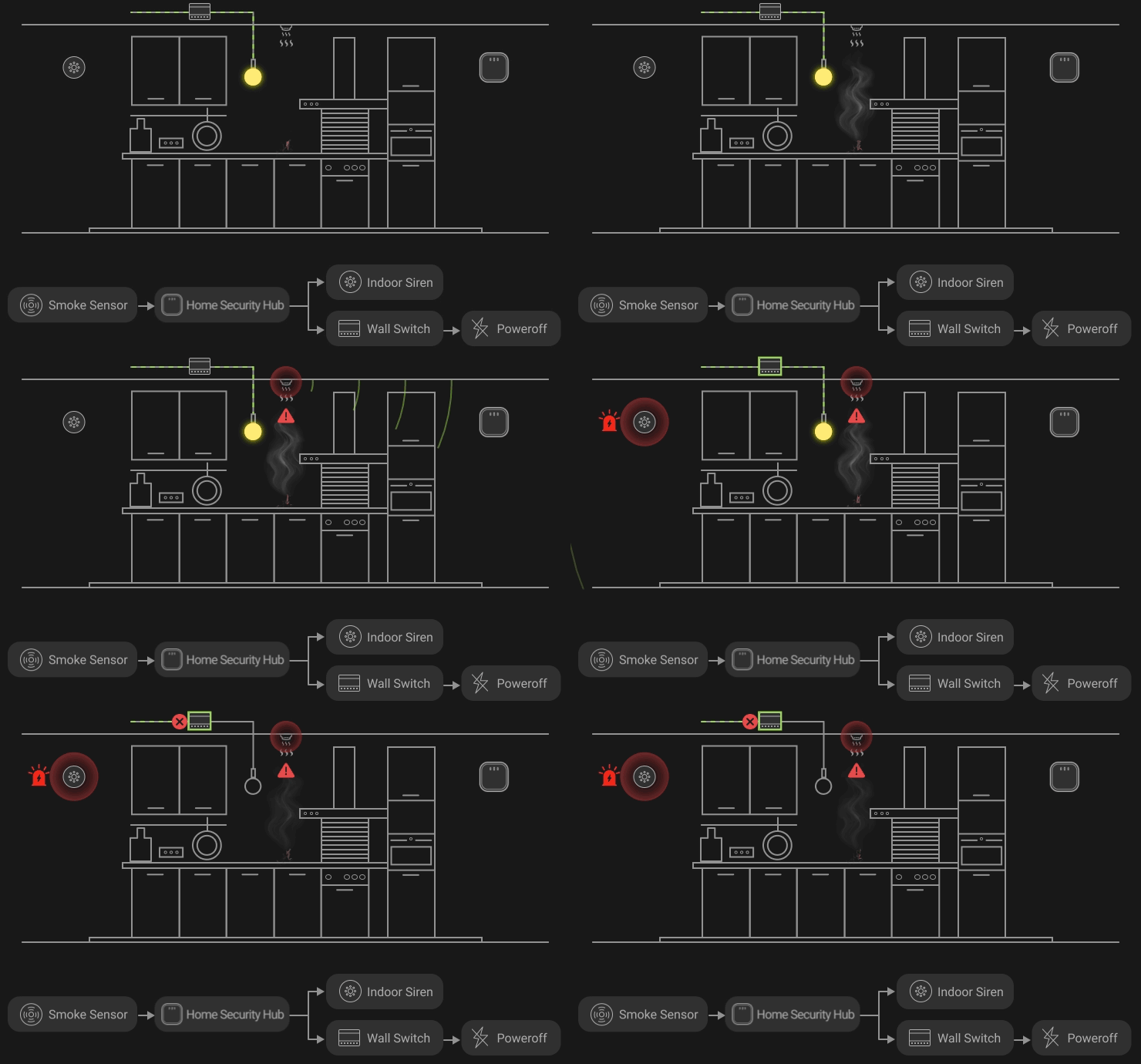
It can monitor the home at all times which might be important in ensuring the safety of the family members. In case of fire, or water seepage, or unauthorized entry, the Smart Hub can at once signal an alarm and also inform the user through the mobile phone.
Further, the Smart Hub contains security features such as encrypted transfer of data and protected login, so there are no information leaks.
6. Energy saving and sustainable living
The Smart Hub which has been put in place is capable of tracking and making adjustment to the power consumption of the appliance in the home hence assisting the users to save power and thus lower electricity bills.
By means of intelligent automation control, the working status of appliance can be adjusted automatically based on the actual situation, for instance, if no one is there, then the lights, air conditioning, and other devices can be turned off which in turn helps to save energy.
7. Improved quality of life
Thus, the application of automated control along with scene modes in the Smart Hub may culminate to creation of a more relaxed and convenient lifestyle. For instance, it can cause curtains to rise during the morning and regulate light during the evening to produce a suitable atmosphere.
On the same note, smart devices that are linked to the hub can further consider health aspects by use of some specifics such as air quality sensors and smart scales hence making the owner sensitive with the overall health status of their family.
8. System scalability
The Smart Hub again has great flexibility where users are able to include other devices which have not been initially installed at the time of installation of smart home system, to make the system even smarter.
In addition, the compatibility is very strong, allowing it to support many brands and terminals, and users can change different smart devices randomly and arbitrarily to quickly build a smart home system suitable for their own preferences.
9. Data analysis and optimization
It can also resume the use frequency of all the apparatus, and offer suggestions and optimization for the user using habits to enhance the intelligence of the Smart Hub. Users also have the opportunity to see previous patterns of their device’s functioning and application history;
Yhis information will help when identifying the problem or improving the process of managing devices.
Types of Smart Hubs for Home Security in the Market
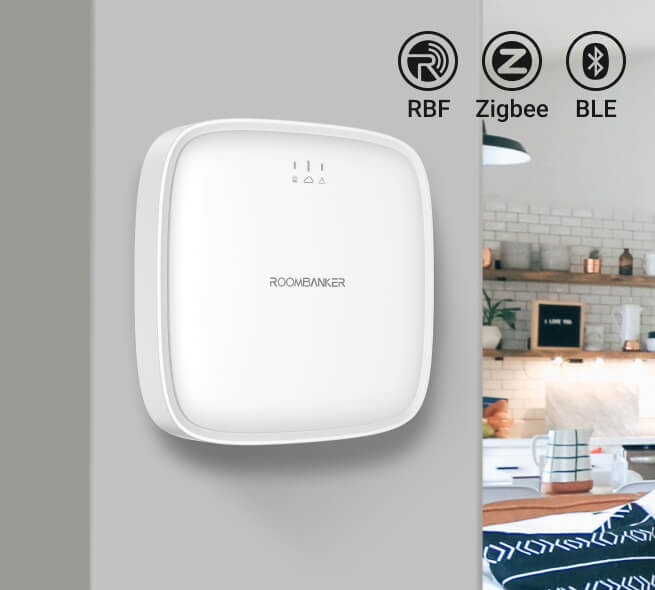
In the market, there are different brands and models of smart hubs with varying shapes and functionalities. They can be categorized into three main types:
| Types | Function | Pros | Cons |
| General smart hub (box-like) | Compact devices focus on connecting and controlling multiple devices, with standard IoT gateway hub functionality. | Easy to install, low cost, support multiple wireless communication protocols, designed for stability and reliability. | No intuitive user interface requires mobile phone app control. |
| Smart hub with a touchscreen | In addition to standard IoT gateway hub functions, it has a touch screen that can display information and videos, providing visual feedback and more direct control. | Intuitive user experience, providing visual feedback and more direct control. | Relatively higher price, higher power consumption, and occupies more space. |
| Smart hub in the form of a voice assistant | Integrates voice assistant functions alongside standard IoT gateway hub functions, enabling voice control, playing music, and answering questions. | Convenient voice control, all-in-one hub, can play music and answer questions. | Mainly relies on voice interaction, with limited visual feedback, not suitable for all scenarios. |
What to Consider When Ordering a Smart Hub for Home Security System?
Ordinary users need to pay attention to the following key points when purchasing smart hubs to ensure they choose high-quality products that meet their needs:
1. Compatibility and scalability
- Device compatibility: Make sure that the Smart Hub is friendly with existing smart brands and types of smart devices that users may be having now and also other additional brands or types that may be installed in the future.
- Communication protocol support: Choose a Smart Hub that can integrate with various protocols that meet the connection needs of various gadgets and the expansion capability of the system.
2. Functions and performance
- Basic functions: Ensure that the Smart Hub has minimal to moderate connection, as well as establishment, control, monitoring, and other functionalities that the users of the system may require to perform their fundamental roles.
- Performance indicators: Focus on evaluating efficiency parameters – the processor speed, storage space, and data transfer rate must be high to guarantee the hub has fast and stable performance and response rate.
3. Security assurance
- Data security: Select Smart Hub that employs one or more of the safety techniques where the user’s information is encoded before transmission and the system consists of a secure user identification mechanism.
- Reliability: Make certain that the Smart Hub to be established or currently used will have a well-bonded network and come up with good system operation to minimize the occurrences of system breakdowns.
4. Ease of use and convenience
- User interface: This point refers to whether the text of the Smart Hub is clearly arranged and easy to understand through the button layout, as well as how easy it is to use.
- Mobile application support: Check if they are stretching and whether their mobile applications are helpful in allowing users to control and monitor devices from a distance and at any time.
5. Price and cost-effectiveness
- Price rationality: Determine also if the Smart Hub is fairly priced or within the consumer’s purchasing power and budget while considering its cost-benefit.
- Functional richness: Relative costs of the product; Add on product functions and performance to assess the viability of the product in terms of cost from the customer’s perspective.
6. After-sales service and support
- Quality assurance: Furthermore, select brands and products that have better product quality assurance in order to avoid manufacturing products that lack stability and durability in the long run.
- After-sales service: Accompanying the abovementioned issues, it is crucial to recognize whether appropriate and perceptive after-sales service and technical support remain provided by the brand, which entails meeting the challenges and concerns of the customers on the usage of their products.
7. User evaluation and word of mouth
- User Evaluation: Concerning the assessment of the impact, it will be wise to pay much attention to the evaluation/feedback made by other users so as to differentiate between the strengths and weaknesses of the particular product and the overall user experience.
- Word-of-mouth reputation: Select brands and products with high credibility, reliability, and quality to enhance the confidence and satisfaction level of the consumers.
8. Update and maintenance
- Firmware update: Determine if new firmware and software releases are made available periodically to enhance the reliability of the system’s operations and capabilities.
- Easy maintenance: Self-heat: Assess whether the maintenance and management of the hub are easy enough to avoid high user maintenance costs and effort.
Regarding the above key points, end-users should consider in order to select the right Smart Hub that meets their needs, it is also noteworthy to enhance the performance and usability of the smart home security system.
Be a Roombanker Distributor to Deliver Reliable Smart Hubs to Every Household
Join the Roombanker team as a distributor and help to become a market leader in smart home systems and technology. As the trusted partner, you will use new generation Roombanker Smart Hubs which incorporate exclusive performance features and stringent security to ensure clear connectivity, appropriate management of the devices, and home security in general.
As a member of the Roombanker distribution channel, you will enjoy extensive training on all our products, intensive marketing support assistance, and excellent after-sales services. Exploring new opportunities together: Thus, you will be able to see the enormous potential for expanding your business in the extensive market for smart homes, providing homeowners, property developers, and businesses with cutting-edge and secure services and products.
This is a unique opportunity to be a member of a company developing the application of artificial intelligence to smart home security systems. Now the time has come to become a Roombanker distributor and contribute to the brilliant opportunity to bring the necessary Smart Hubs to each home, changing people’s lives and their perception of protection at work or home.