Doors
Make opening detection part of your indoor entry-point protection.
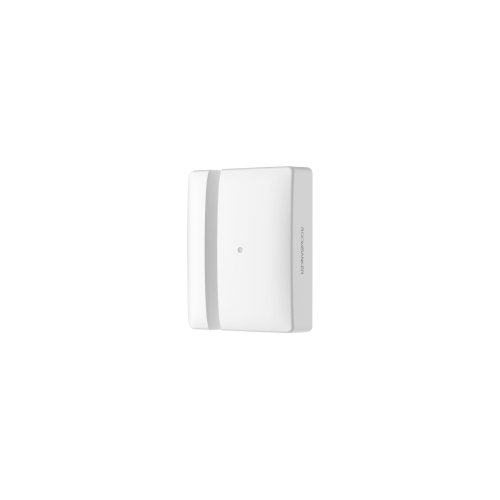
Wireless door & window protection
Know when it opens.
Know when it tilts.
Opening and tilt detection for indoor doors, windows and skylights. Bring more of your property's entry points into your Roombanker security system.

Open space, with the Hub
Calculated in standby mode
Five selectable angle settings
Choose the version for your region
Protect the points of entry
G2 uses two reed switches to detect opening events. When armed, the sensor reports an alarm to the Hub—bringing indoor doors, windows and skylights into your security system.
Make opening detection part of your indoor entry-point protection.
Monitor opening events, with adjustable tilt detection for additional awareness.
Include overhead openings in your indoor security planning.
Rear tamper protection adds device supervision. Opening alarms depend on your arming settings and the sensor's connection to the Hub.
Beyond opening detection
Choose the tilt angle that triggers an alarm when the system is armed. Set a reporting delay so the sensor reports after the tilt remains beyond your selected threshold.
Configure tilt settings in RB Link. The highlighted 15° is an example setting.
More ways to connect
G2 supports external contact and roller shutter inputs, giving installers more options for the openings in a project.
Connect an external detector using the supplied terminal. A triggered external contact can raise an alarm when the system is armed.
Configure the reporting time and impulse count for a connected roller shutter contact in RB Link.
Confirm the external device's electrical compatibility and wiring before installation.
Wireless by design
RBF communication and a replaceable battery make G2 a practical part of your Roombanker security system.
Wireless communication with the Hub in open space. Choose an 868 MHz or 915 MHz model for your sales region.
Calculated battery life in standby mode. Low-battery notifications in RB Link help you plan a replacement.
1,400 m is an open-space range, not an indoor coverage guarantee. Battery life varies with use and operating conditions.
Works with Roombanker Home Security Hubs and RBF repeaters.

RB Link app
Check the device, organise it by room and manage its settings from RB Link through your connected Hub.
Review arming, alarm and lid status, along with signal strength, connection and battery level.
Name your device, assign it to a room and choose whether to show it on the app homepage.
Activate Find Me to flash the device's green indicator—helpful when identifying one sensor among several.
Download and install available firmware updates through the app when the Hub is connected to the internet.
Get connected with RB Link
Follow the guided pairing process, then check the connection at your intended installation position.
Open your Home Security Hub in RB Link. Tap “+” and select “Add peripheral”.
Pull out the battery insulation strip. When the sensor appears in the app, assign a room and tap “Done”.
Run Signal Strength Test in device settings. Check the app feedback and the sensor's indicator before mounting.
If the sensor does not appear and its green indicator is off, hold the register button for 5 seconds and try again. Choose another location if the signal test shows red.
Open the quick start guideChoose with confidence
Key technical specifications for Door Window Sensor G2.
| Opening detection | 2 reed switches |
|---|---|
| Tilt threshold | 5° / 10° / 15° / 20° / 25°Default: 5° |
| Tilt reporting delay | 1–60 secondsDefault: 2 seconds |
| External input modes | External contact / roller shutter |
| Tamper protection | Rear |
| Compatibility | Roombanker Home Security Hubs and RBF repeaters |
| Communication | Two-way RBF wireless |
|---|---|
| Frequency bands | 863–870 MHz / 902–928 MHzDepends on regional model |
| Wireless range | Up to 1,400 mOpen space, with Hub |
| Battery | 1 × CR123A |
| Calculated battery life | Up to 5 yearsStandby mode |
| Operating voltage | 2.5–3.3 VNominal: 3 V |
| Application | Indoor |
|---|---|
| Body dimensions | 90 × 21 × 21 mm |
| Weight | 71 g |
| Operating temperature | −10°C to +55°C14°F to 131°F |
| Operating humidity | Up to 90% |
| Storage temperature | −20°C to +60°C−4°F to 140°F |
Select the frequency version for your region and compatible system. Wireless range is specified for open space; actual range depends on the installation environment. Battery life is calculated for standby operation.
1 sensor · 1 magnet · 4 mounting screws · 4 wall plugs · 2 adhesive tapes · 1 external-detector terminal · 1 quick start guide
Official documentation for planning, setup and daily use.
Before you choose
Answers to common questions about system requirements, settings and use.
Yes. G2 communicates with a Roombanker Home Security Hub over RBF wireless. Use the Hub and RB Link app to add the sensor and manage its settings. It is compatible with Roombanker Home Security Hubs and RBF repeaters.
G2 is specified for indoor use. Plan installations on the indoor side of doors, windows or skylights within the stated operating temperature and humidity limits.
In RB Link, choose a threshold of 5°, 10°, 15°, 20° or 25°. The tilt reporting delay can be set from 1 to 60 seconds. Defaults are 5° and 2 seconds. When armed, the sensor reports after the tilt remains beyond the configured threshold for the selected delay.
G2 uses one replaceable CR123A battery. The calculated battery life is up to 5 years in standby mode; actual life varies with use and conditions. RB Link displays the battery level and notifies you when it is low.
Yes. G2 supports external contact and roller shutter input modes. Roller shutter settings include a reporting time of 5 to 30 seconds in 5-second steps and an impulse count of 2 to 7. Confirm the external device’s electrical compatibility and wiring before installation.
Plan your next installation
Tell us about your doors, windows and system requirements. Talk to Roombanker about the G2 model and purchasing options for your region.